
Mobile proxies are gaining significant traction as more platforms shift to mobile-first detection and app-based workflows. According to 360 Research Reports' September 2026 proxy market analysis, mobile proxies are the fastest-growing segment with 34% year-over-year growth and now represent 16% of global proxy traffic. However, they typically cost 2-3× more per gigabyte than residential proxies, so understanding when you actually need them — and when residential works fine — matters for both your budget and success rate.
What Are Mobile Proxies?
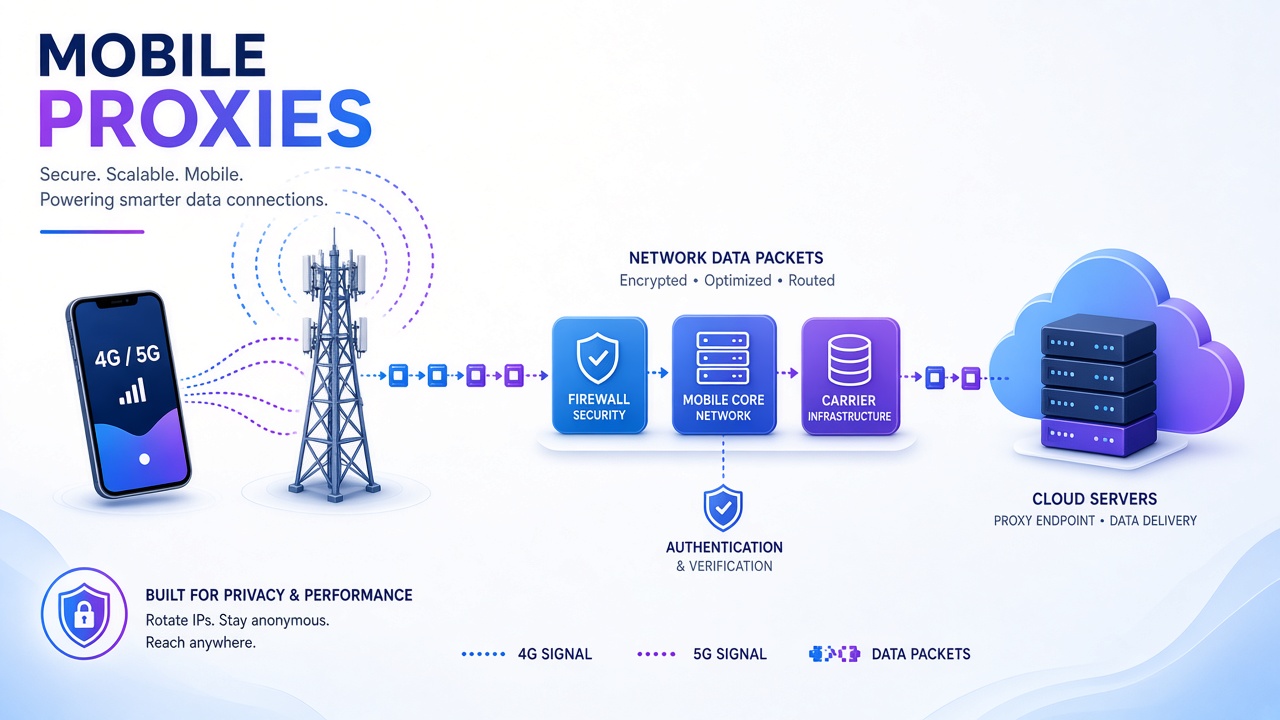
A mobile proxy routes your requests through a real device connected to a cellular carrier's 4G or 5G network. The exit IP address is assigned by a mobile network operator (like T-Mobile, Verizon, Vodafone, or regional carriers), not a home ISP. To websites and platforms, your traffic appears to come from a legitimate mobile phone user.
The physical setup varies by provider: some use racks of modems with active SIM cards, others use actual phones, and some use USB dongles. What matters is the connection type — the device must be using cellular data, not WiFi, for the IP to qualify as mobile.
How Mobile Proxies Work: The Technical Path
When you send a request through a mobile proxy, the flow looks like this:
- Your application connects to the proxy gateway using credentials the provider gave you (typically HTTP/HTTPS or SOCKS5)
- The gateway routes your request to a cellular device — a modem, phone, or dongle with an active SIM connection
- The device forwards traffic over the carrier's network through the Evolved Packet Core (LTE) or 5G Core infrastructure
- The target website sees the carrier's public IP assigned to that cellular connection
- The response travels back through the same path to your application
Why CGNAT Makes Mobile IPs Harder to Block
Most mobile carriers use Carrier-Grade Network Address Translation (CGNAT), which means one public IPv4 address can be shared by hundreds or thousands of real subscribers at the same time. Blocking a single mobile IP would affect many innocent users, so platforms are more cautious about blanket IP bans on mobile ranges.
This structural advantage is why mobile proxies often have the lowest block rates, especially on mobile-first platforms like Instagram, TikTok, and Snapchat.
Mobile Proxies vs Residential Proxies: The Real Differences
Both mobile and residential proxies use IPs that look "real" to websites, but they differ in critical ways:
| Attribute | Mobile Proxies | Residential Proxies |
|---|---|---|
| IP Source | Cellular carriers (4G/5G networks) | Home ISPs (broadband connections) |
| Block Resistance | Highest due to CGNAT sharing | High, but identifiable per household |
| Typical Latency | 80-300ms (carrier overhead) | 30-120ms (direct broadband) |
| Cost per GB | $$$$ (most expensive) | $$ (baseline for legitimate IPs) |
| Session Stability | Medium (carrier controls rotation) | High (sticky up to 24 hours) |
| Pool Size | Smaller (hardware-limited) | Larger (64M-400M claimed IPs) |
| Geo Targeting | Country, carrier, sometimes city | Country, state, city, ZIP, ASN |
| Best For | Mobile apps, social platforms, carrier checks | Web scraping, price monitoring, SEO tracking |
For a deeper comparison between residential and datacenter proxies, see our complete residential vs datacenter guide.
When You Actually Need Mobile Proxies
Mobile proxies justify their premium price in specific situations. Here's when to reach for them:
1. Mobile-Only or Mobile-First Content
Some platforms serve materially different data to mobile clients than desktop. If the content you need only appears in mobile responses — different product listings, mobile-specific offers, app-only inventory — a mobile proxy isn't optional. It's a correctness requirement, not just an anti-bot workaround.
2. Social Media Multi-Accounting and Automation
Instagram, TikTok, Snapchat, and other mobile-first social platforms heavily penalize desktop IPs and session inconsistencies. Mobile proxies with sticky sessions (where you control rotation per account) dramatically reduce the risk of account flags and shadowbans. Each account should maintain one consistent mobile IP throughout its session.
3. Mobile Ad Verification
If your job is to verify what ads actually appear to mobile users in specific locations or on specific carriers, you need a real mobile exit. This is verification by definition — you're checking the mobile user experience, so the traffic must originate from a mobile network.
4. App-Based Workflows and APIs
Mobile apps often include additional device and network checks that don't exist on web versions. Private APIs behind mobile apps may validate carrier origin or reject datacenter ranges entirely. Mobile proxies let you access these endpoints as they expect to be accessed.
5. After Residential Proxies Have Measurably Failed
This is the last-resort case: you've tested quality residential proxies with proper request hygiene (realistic headers, rate limiting, session handling) and measured a consistently high block rate on a specific target. At that point, mobile proxies may be the only path forward before concluding the target is unscrapeable.
When Residential Proxies Are Enough
For the majority of web scraping and data collection tasks, residential proxies deliver better value:
- E-commerce price monitoring: Public product pages render the same on desktop as mobile in most cases
- Search engine result scraping: SERP tracking works with residential IPs; mobile-specific SERPs need mobile when accuracy matters
- Market research and competitor analysis: Catalog and review data typically doesn't require mobile origin
- General geo-restricted content: Location matters more than device type for most geo-unlocking
- High-volume scraping: Per-GB costs make residential the practical default for large datasets
Start with residential proxies and only switch to mobile when you've measured a clear failure on that specific target. Don't pay the mobile premium based on assumptions.
How to Use Mobile Proxies Effectively
Understand Rotation Behavior
Mobile IP rotation is different from residential. With most mobile proxy providers:
- The carrier can rotate your IP on its own schedule (you don't control this)
- Providers often offer a rotation API endpoint that triggers a new IP by reconnecting the device (simulating airplane mode)
- Sticky sessions keep the same IP until you manually rotate or the carrier reassigns it
- After rotation, you might get the same IP back — carriers reuse addresses from their pool
Match Proxy Type to Use Case
Mobile proxy providers typically offer two modes:
- Rotating mobile proxies: New IP per request or after a short duration — best for scraping tasks where you need many different mobile IPs
- Sticky mobile proxies: Hold the same IP for minutes or hours — essential for logged-in sessions, account management, and workflows where IP changes would reset your session
Target Specific Carriers When Needed
Some providers let you specify carrier ASNs (AT&T, Verizon, T-Mobile, etc.). Use this when:
- Testing carrier-specific content or offers
- Verifying mobile ads served on particular networks
- Debugging issues that only appear on certain carriers
Monitor Your Bandwidth Usage
Mobile proxies are metered per GB, and they're the most expensive proxy type. To control costs:
- Disable auto-loading of images and videos when you don't need them
- Request only the data fields you actually need (use APIs when available instead of scraping full pages)
- Implement smart caching to avoid re-fetching unchanged content
- Test your scraper's bandwidth usage on a small sample before scaling up
Common Mobile Proxy Mistakes to Avoid
1. Using Mobile Proxies by Default
The most expensive option isn't automatically the best. Mobile proxies solve specific problems; for general web scraping, residential proxies deliver better cost-per-result. Test residential first and measure actual block rates before upgrading to mobile.
2. Ignoring Request Hygiene
A mobile IP doesn't bypass all anti-bot systems. You still need realistic headers, appropriate rate limiting, proper cookie handling, and session management. See our guide on how to avoid getting blocked while web scraping for full best practices.
3. Assuming All Mobile Providers Are Equal
Pool quality varies dramatically. Some providers source IPs ethically from opted-in users or owned devices; others use questionable methods. Check provider reputation, look for transparency about their IP sourcing, and test on your actual target before committing to a large plan.
4. Not Testing Latency Impact
Mobile proxies add significant overhead (80-300ms vs 30-120ms for residential). If you're scraping thousands of pages, that latency compounds. Calculate total job time before assuming mobile is fast enough for your workflow.
Mobile Proxy Pricing: What to Expect
Mobile proxy pricing varies significantly by provider, volume tier, and location. Based on verified October 2026 public pricing from major providers:
- Decodo (formerly Smartproxy): $4/GB pay-as-you-go (with active promotion), monthly plans from $2.75-3.75/GB depending on volume
- Oxylabs: Approximately $9/GB pay-as-you-go, dropping to around $3.50/GB at enterprise tiers
- IPRoyal: $117-130/month for dedicated mobile proxies
- ProxyEmpire: From $125/month for dedicated mobile with on-demand rotation
For comparison, residential proxies from these same providers typically range from $1.75-4/GB (Decodo: $2/GB baseline, IPRoyal: $1.75/GB). The mobile premium is substantial — generally 2-3× higher per gigabyte than residential.
Note: Bright Data previously offered mobile proxies but sunset the product for new customers in April 2026. Existing subscribers may retain access, but new signups cannot purchase mobile proxy services from Bright Data.
Which Providers Offer Mobile Proxies?
Several providers in our proxy directory offer mobile proxy products. Pricing, pool size, and features vary — check each provider's current documentation:
- Smartproxy (now Decodo): 10M+ mobile IPs, HTTP/HTTPS/SOCKS5, $2.25-4/GB depending on volume
- Oxylabs: Enterprise-focused mobile proxies with compliance support and account management
- SOAX: Mobile and residential proxies with flexible rotation controls
- IPRoyal: Dedicated mobile proxies alongside residential and datacenter options
Note on Bright Data: Bright Data sunset mobile proxies for new customers in April 2026. If you have an existing subscription, you may retain access; new signups should consider the alternatives listed above.
Many providers offer trial plans or money-back guarantees. Test on your actual target before committing to a large plan — what works for one use case may not work for another.
Performance Data: Provider-Published Benchmarks
QuanticData published a September 2026 comparison testing their own mobile and residential proxy networks on identical targets. While this is a vendor testing their own service (not independent third-party data), the results illustrate typical performance trade-offs between mobile and residential proxies:
- Geo-targeting accuracy: Both achieved 100% (all IPs landed in requested countries)
- Speed: Residential was faster — 1.26s median time-to-first-byte vs 1.74s for mobile
- Fraud scoring: Mobile IPs scored cleaner — median fraud score of 1 vs 2 for residential on Scamalytics
- Cost efficiency: Residential was significantly cheaper — $0.10-0.12 per 1,000 pages vs $0.28-0.60 for mobile at their pricing
The key takeaway: mobile's primary advantage is detection resistance and reputation (lower fraud scores), not speed or cost. When choosing between mobile and residential, prioritize what your specific target values most.
The Mobile Proxy Decision Tree
Here's a quick decision framework:
- Is the content mobile-only or mobile-app-specific? → Yes: Use mobile proxies
- Are you managing social media accounts on mobile-first platforms? → Yes: Use mobile proxies with sticky sessions
- Is this mobile ad verification or carrier-specific testing? → Yes: Use mobile proxies
- Have you tested residential proxies and measured a high block rate? → Yes: Try mobile as the next step
- Is this general web scraping, price monitoring, or SERP tracking? → No: Start with residential proxies
Frequently Asked Questions
Are mobile proxies more anonymous than residential proxies?
Not exactly. Both mobile and residential proxies use "real" IPs, so both appear legitimate to websites. Mobile proxies benefit from CGNAT (one IP shared by thousands of users), which makes individual traffic harder to isolate. However, advanced fingerprinting can still detect automation regardless of IP type. Focus on complete request hygiene, not just IP source.
Can I use mobile proxies for web scraping at scale?
You can, but it's expensive. Based on October 2026 pricing, mobile proxies cost 2-3× more per GB than residential (for example, Decodo charges $4/GB for mobile vs $2/GB for residential). For high-volume scraping (thousands of pages daily), residential proxies offer better economics unless the target specifically requires mobile origin. Calculate your projected bandwidth usage before committing to mobile for large-scale work.
Do mobile proxies work with all web scraping tools?
Yes — mobile proxies support standard protocols (HTTP, HTTPS, SOCKS5) just like any other proxy type. They integrate with Scrapy, Puppeteer, Selenium, and other tools the same way residential or datacenter proxies do. Check our guide on web scraping tools that work best with proxies for integration examples.
How long does a mobile proxy IP stay the same?
It depends on the provider and rotation mode. In rotating mode, you get a new IP per request or every few minutes. In sticky mode, the IP typically lasts from 10 minutes to several hours, but the carrier can reassign it at any time — you don't have full control like you do with static ISP proxies. If you need guaranteed long-term static IPs, check out static residential (ISP) proxies instead.
Are mobile proxies legal?
Using mobile proxies is legal in most jurisdictions, but how you use them matters. Respect website terms of service, don't violate laws (like the CFAA in the US), and avoid platforms that explicitly prohibit automated access. Ethical scraping practices apply regardless of proxy type. Read our full guide on whether residential proxies are legal — the same principles apply to mobile proxies.
Can websites detect that I'm using a mobile proxy?
Sophisticated platforms can detect proxy use through a combination of signals: request patterns, browser fingerprints, TLS behavior, header inconsistencies, and timing patterns. A mobile IP reduces one risk factor (IP reputation), but it doesn't make you invisible. Combine mobile proxies with proper session management, realistic headers, and human-like behavior for best results.
Conclusion: Mobile Proxies as a Specialized Tool
Mobile proxies occupy a specific niche in the proxy ecosystem. They're not a general-purpose replacement for residential proxies — they're a premium tool for mobile-first platforms, app-based workflows, and targets where residential IPs have demonstrably failed.
For most web scraping, data collection, and monitoring tasks, residential proxies deliver the best balance of cost, speed, and success rates. Use mobile proxies when the use case demands it: mobile-only content, social media account management, mobile ad verification, or as a measured escalation when residential proxies aren't working.
Ready to compare proxy providers? Browse our complete directory to find providers offering mobile, residential, and datacenter proxies, with transparent pricing and feature comparisons.
Tags
Proxy & Web Scraping Research Team
The ProxyCorner editorial team researches, tests, and reviews residential, datacenter, mobile, and ISP proxy providers. Every review is backed by our standardized monthly benchmark suite — 10,000+ test requests per provider, 5-region speed measurements, and independent IP pool verification.
Reviews follow our published testing methodology, including affiliate disclosure and editorial independence standards.
Ready to Choose a Proxy Provider?
Explore our comprehensive directory of residential proxy providers and find the perfect match for your web scraping needs.
Browse Proxy Providers